Introduction
IBO Player is one of the best IPTV apps on the market, allowing users to stream IPTV content on a variety of devices. With a user-friendly interface, powerful features and support for a variety of formats, the app is ideal for German users looking to optimize their IPTV experience. In this step-by-step guide, you will learn how to configure and activate IBO Player.
What is IBO Player?
IBO Player is an advanced IPTV player app designed to play IPTV content smoothly. The app supports M3U lists and Xtream codes, which makes it particularly versatile. It works on devices such as smart TVs, Android boxes, Fire TV sticks and smartphones.
Steps for installing IBO Player
1. installation on a Smart TV
- Open the App Store of your Smart TV (e.g. LG or Samsung).
- Search for "IBO Player".
- Download and install the app.
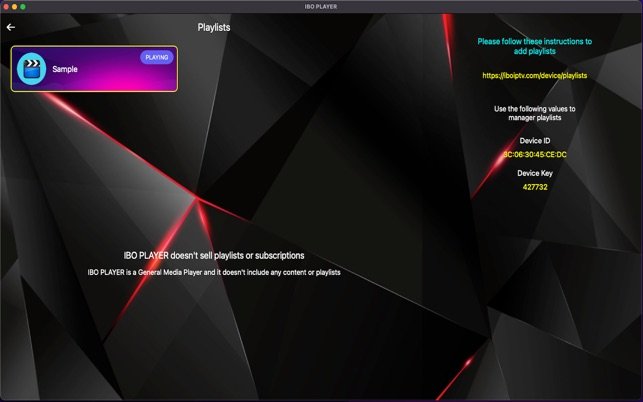
- After the installation, start the app to Device code to receive.
2. installation on an Android or iOS device
- Open the Google Play Store or the Apple App Store.
- Enter "IBO Player" in the search bar.
- Download and install the app.
- Start the app and make a note of the device code.
3. installation on a Fire TV Stick
- Go to the Settings of the Fire TV Stick and activate the installation from unknown sources.
- Download the Downloader app down.
- Enter the URL to the APK file from IBO and install the app.
- Start the app to obtain the device code.
How do I activate IBO?
- Open the official IBO Player website on your computer or smartphone.
- Go to the Activation area and enter the device code.
- Select the desired License period (usually 6 or 12 months).
- Complete the payment.
- After successful activation, you can use the app with your IPTV data.
Configuration of IPTV in IBO
1. adding an M3U list
- Open the IBO Player app.
- Go to the Settings and select "Add playlists".
- Enter the name of the playlist and the URL of your M3U list.
- Confirm the entry. The channels should now be loaded.
2. use of Xtream codes
- Select the "Add Xtream API" option in the app.
- Enter the server URL, the user name and the password.
- Save the configuration.
- The channel list is synchronized automatically.
Tips for German users
- EPG integration: Make sure that your IPTV provider provides EPG (Electronic Program Guide) data to display the channels with program overviews.
- Support for German channels: Many IPTV providers offer packages with German channels. Make sure you choose a package that covers these channels.
- VPN usage: For a stable connection and additional data protection, we recommend using a VPN service, especially with international IPTV providers.
Troubleshooting for IBO
1. channels do not load
- Check the Internet connection.
- Make sure that the M3U or Xtream codes have been entered correctly.
- Contact your IPTV provider to ensure that the server is active.
2. problems with the app
- Update the app to the latest version.
- Delete the app cache in the settings of your device.
- Uninstall the app and install it again.
Conclusion
IBO Player offers a simple and efficient way to enjoy IPTV content on different devices. With the steps described above, you can easily install, activate and configure the app. Be sure to choose a reliable IPTV provider to ensure the best possible streaming experience.